Database Connection
Description
Database connection Environment entries are used to declare the parameter to access a database. They define a connection between Orchestra and a database.
Purpose of object
It is e.g. used by the channels Database BLOB Reader, Database Outbound, Database Reader, Database Source Reader, Database Target, Database Listener to declare the database to use.
Configuration
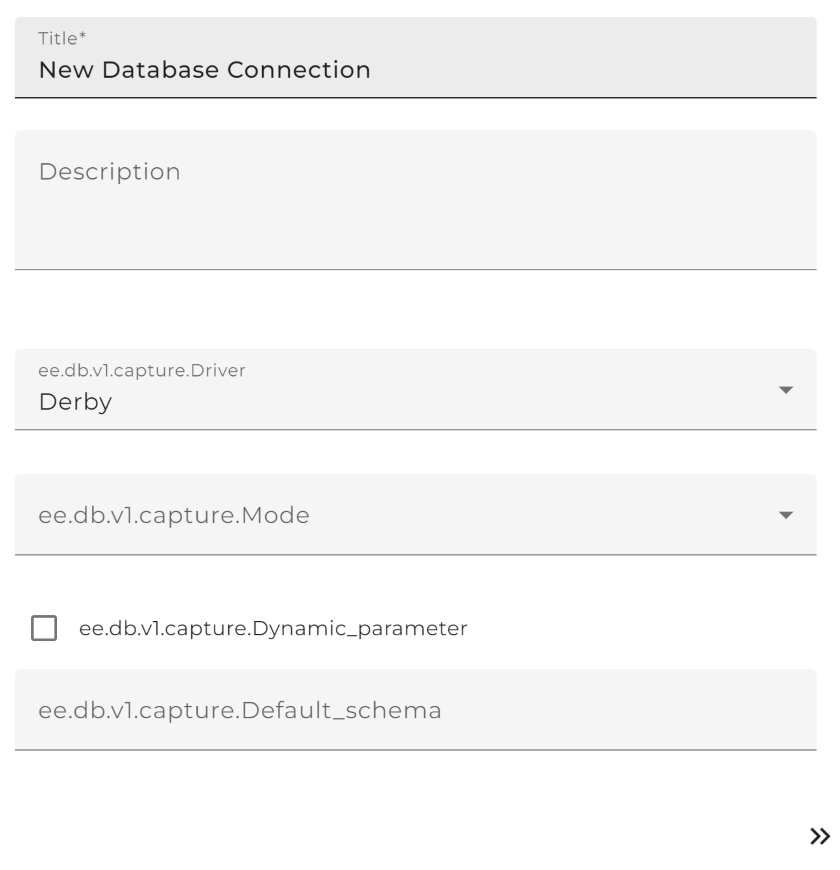
Step by Step
Using predefined database
-
Create an Environment entries of type database connection.
-
Click on button Select database driver and choose the database type to use. If the intended database isn't listed look at section "Using not predefined databases"
-
The fields JDBC driver, XA driver and JDBC URL are filled automatically.
-
Replace all parameter marked by `` with the required information.
-
Select JDBC scope if necessary:
- Global scope : Orchestra just looks in its lib directory for the JDBC driver. This option is set by default and shouldn't be changed in usual cases.
- Load driver from scenario archive : Orchestra first looks in external archive for the JDBC driver before searching in its lib directory. This should just be used if you want to use a special driver, e.g if another version of the driver is needed from external archives .
-
Enter usename and password of the database user.
-
Optionally: Choose a Default Schema of the database. In case of Oracle this is typically the same as the username; in case of MySQL this is typically the name of the database.
-
The field Login timeout describes the time in seconds after that a login fails. 0 means to wait without limit. You may want to set this if you want to avoid that the startup hangs indefinitely. This property is not supported by all JDBC driver!
-
Automatically: Additional properties is filled automatically with some properties for the c3p0 connection pool and the XA connection pool.In Orchestra the database channels use the c3p0 connection pool to avoid repeatedly connecting to and disconnecting from the database. The parameter c3p0.acquireRetryAttempts is the number of retry attempts until the connection pool gives up and throws an exception. Because Orchestra has its own retry mechanism it can be sensible to set the default value 30 to a smaller value especially if you once encountered the problem that the startup of the Orchestra runtime was very slow because the channels tried to get a connection on startup and that didn't work for some reason. The parameter c3p0.acquireRetryDelay is the delay in milliseconds between two retries of the pool.The parameter c3p0.checkoutTimeout is the number of milliseconds a channel will wait for a new connection.
-
Click Test : An info window will appear, which shows whether the test of the connection was successful.
-
If the test was successful click on Finish .
Using not predefined database
- To use a not predefined database the fitting JDBC driver is necessary. Get the appropriate library for your database. Now two options are possible:
- Copy the jar-file in your_directory/Orchestra/WEB-INF/lib directory.
- Load the jar file as external archive, type Standard Java Archive as scenario library.
-
Create an Environment entries of type database connection.
-
Fill in the JDBC driver of the using database, e.g. for Sybase: com.sybase.jdbc2.jdbc.SybDriver
-
Add a random value in field XA driver to satisfy the dialog. This declaration is just necessary in case of distributed transactions(e.g. one statement for two databases)
-
Add the JDBC URL of the database to use, e.g. Sybase: jdbc:sybase:Tds:
host:port?ServiceName=DBNAME -
Replace all parameter marked by `` with the required information.
-
Select JDBC scope depending on the way you integrated the drivers jar file:
- Copied in lib directory: select Global scope. Orchestra just looks in his archive and will find the fitting driver.
- Integrated as scenario library: select Load driver from scenario archive : Orchestra first looks in external archive for the JDBC driver and will find the driver, because you imported it.
- Follow step 6 to 9 of step by step guide using predefined database
Connecting to the orchestra runtime database
Normally, the database environment entry is used to connect to an external database (Mode = "Connect to an external database").
When the user wants to connect to the internal orchestra runtime database the Mode has to be switched to "Connect to the internal runtime database". If this mode is set, the system automatically connects to the runtime db when the scenario is deployed to the server. If the scenario is used in the designer the given settings are used to establish a connection since no runtime database is available.
Dynamic connection configuration
In case that a process model has to connect to different database, it is possible to specify the database connections settings dynamically. In order to activate this feature, one has to define dynamic parameters in the database environment entry. In consequence, whenever a channel, that uses a dynamic database connection is used, the additional connection parameters can be passed during the channel invocation.
If the dynamic connections are needed, the Dynamic parameter field has to be switched to "Enabled". If one the following fields contains a variable declaration ( in format $(variable-name) ), the actual values can be passed dynamically by the channel invocation:
- JDBC driver
- JDBC URL
- Database user
- Database password
- Default schema
The following picture contains a sample configuration of a database environment entry with dynamic parameters:
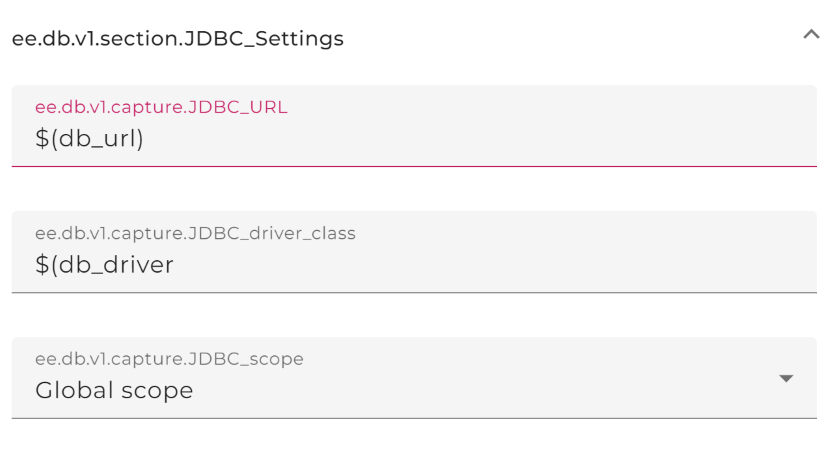
The defined variables are passed to channels and then can be handed over the values on process models.
⚠️ Note: The "Database user" and "Database password" can be handed over by the encrypted values.
⚠️ Note: Dynamic connections are only allowed for database outbound channels.